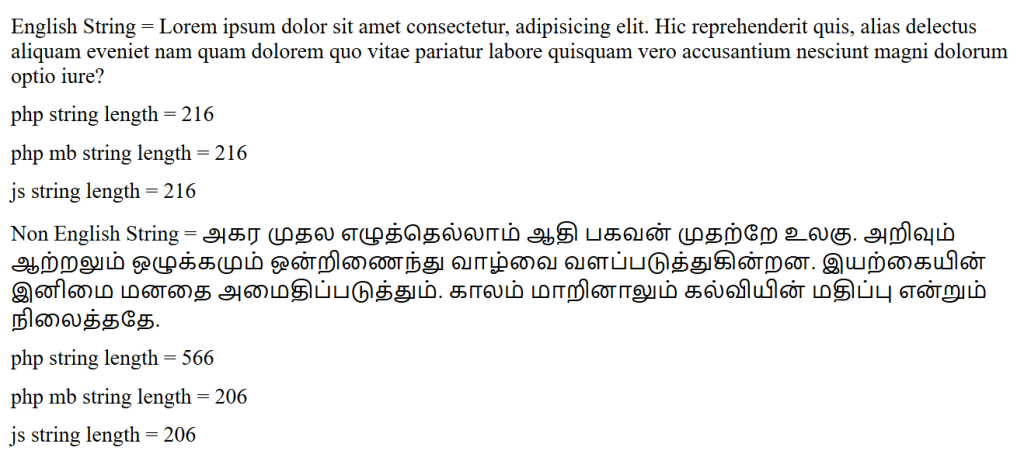
When working with strings in PHP, it’s common to use strlen() to determine the length of a string. However, if your application supports languages like Tamil, Hindi, Japanese, Chinese, or emojis, strlen() may not return the result you expect.
In this article, we’ll compare strlen(), mb_strlen(), and JavaScript’s length property using both English and Tamil text.
Test Data
We will use the following strings:
English String
$str1 = "Lorem ipsum dolor sit amet consectetur, adipisicing elit...";
Tamil String
$str2 = "அகர முதல எழுத்தெல்லாம் ஆதி பகவன் முதற்றே உலகு...";
Measuring String Length
Our PHP code displays the length using three different methods:
strlen($str);
mb_strlen($str);
The browser also calculates the length using JavaScript:
str.length
Results
English Text
| Function | Result |
|---|---|
strlen() | Same as character count |
mb_strlen() | Same as character count |
JavaScript length | Same as character count |
For English text, all three methods usually return the same value because English characters occupy a single byte in UTF-8.
Tamil Text
The situation changes completely with Unicode languages.
| Function | What it Counts |
|---|---|
strlen() | Number of bytes |
mb_strlen() | Number of Unicode characters |
JavaScript length | Number of UTF-16 code units |
Since Tamil characters require multiple bytes in UTF-8, strlen() returns a much larger number than the actual number of readable characters.
For example:
தமிழ்
Depending on the encoding:
echo strlen("தமிழ்");      // Larger value (bytes)
echo mb_strlen("தமிழ்");   // 5 characters
The exact byte count depends on the UTF-8 encoding of each character, while mb_strlen() correctly reports the number of characters.
Why Does This Happen?
strlen()
strlen() simply counts bytes stored in memory.
For example:
A = 1 byte
B = 1 byte
C = 1 byte
So:
strlen("ABC") // 3
But Tamil letters occupy multiple bytes:
அ = 3 bytes
க = 3 bytes
ர = 3 bytes
Therefore:
strlen("அகர")
returns the total number of bytes rather than the number of visible characters.
mb_strlen()
The mb stands for MultiByte.
mb_strlen() understands UTF-8 encoding and counts actual Unicode characters instead of bytes.
echo mb_strlen($str, "UTF-8");
or simply
echo mb_strlen($str);
provided your internal encoding is UTF-8.
Whenever your application supports international languages, this is the recommended function.
JavaScript length
JavaScript behaves differently.
const str = "தமிழ்";
console.log(str.length);
JavaScript stores strings as UTF-16. The length property returns the number of UTF-16 code units.
For most Tamil letters, this often appears close to the visible character count, but it’s not a true Unicode character count.
Characters outside the Basic Multilingual Plane (such as many emojis) occupy two UTF-16 code units.
Example:
"😀".length
returns:
2
even though only one emoji is displayed.
Which Function Should You Use?
| Scenario | Recommended Function |
|---|---|
| ASCII / English only | strlen() |
| UTF-8 multilingual websites | mb_strlen() |
| Word limits | mb_strlen() |
| Form validation | mb_strlen() |
| Database field validation | mb_strlen() |
| JavaScript UI display | length (with Unicode caveats) |
Best Practice
If your application may contain:
- Tamil
- Hindi
- Japanese
- Chinese
- Korean
- Arabic
- Emojis
always prefer:
mb_strlen($string)
instead of:
strlen($string)
Also ensure the Multibyte String extension (mbstring) is enabled in your PHP installation.
Complete Example
$str1 = "Lorem ipsum dolor sit amet...";
$str2 = "அகர முதல எழுத்தெல்லாம் ஆதி பகவன் முதற்றே உலகு.";

echo strlen($str1);
echo mb_strlen($str1);

echo strlen($str2);
echo mb_strlen($str2);
Conclusion
The difference between strlen() and mb_strlen() is simple but important:
strlen()counts bytes.mb_strlen()counts characters.- JavaScript’s
lengthcounts UTF-16 code units, which usually—but not always—match the number of visible characters.
If your PHP application supports multiple languages, using mb_strlen() will help you avoid incorrect character counts, validation errors, and unexpected behavior with Unicode text.
<?php

$str1 = "Lorem ipsum dolor sit amet consectetur, adipisicing elit. Hic reprehenderit quis, alias delectus aliquam eveniet nam quam dolorem quo vitae pariatur labore quisquam vero accusantium nesciunt magni dolorum optio iure?";
$str2 = "அகர முதல எழுத்தெல்லாம் ஆதி பகவன் முதற்றே உலகு. அறிவும் ஆற்றலும் ஒழுக்கமும் ஒன்றிணைந்து வாழ்வை வளப்படுத்துகின்றன. இயற்கையின் இனிமை மனதை அமைதிப்படுத்தும். காலம் மாறினாலும் கல்வியின் மதிப்பு என்றும் நிலைத்ததே.";
?>

<!DOCTYPE html>
<html lang="en">
<head>
  <meta charset="UTF-8">
  <meta name="viewport" content="width=device-width, initial-scale=1.0">
  <title>Document</title>
  <style>
    div{
      margin: 10px 0;
    }
  </style>
</head>
<body>
  <div>English String = <?php echo $str1; ?></div>
  <div>php string length = <?php echo strlen($str1); ?></div>
  <div>php mb string length = <?php echo mb_strlen($str1); ?></div>
  <div>js string length = <span id="jsstr1len"></span></div>

    <div>Non English String = <?php echo $str2; ?></div>
  <div>php string length = <?php echo strlen($str2); ?></div>
  <div>php mb string length = <?php echo mb_strlen($str2); ?></div>
  <div>js string length = <span id="jsstr2len"></span></div>


<script>
  const str1 = "<?php echo $str1; ?>";
  document.getElementById("jsstr1len").innerText = str1.length;

   const str2 = "<?php echo $str2; ?>";
  document.getElementById("jsstr2len").innerText = str2.length;
</script>
</body>
</html>